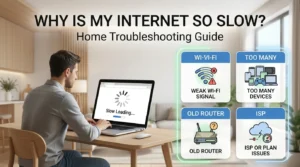
Router Speed Troubleshooter Canada: Find Why Wi-Fi Is Slow
Last updated: June 2026. This tool gives a practical troubleshooting estimate. It does not run a live speed test or access your router settings.
On this page
Router Speed Troubleshooter
Answer these questions to find out whether slow internet is more likely caused by your ISP connection, modem, router, Wi-Fi coverage, device, cable, or plan.
Your likely bottleneck
What this likely means
Your best next steps
Quick Answer: Is It the Router or the Internet Provider?
The easiest way to separate a router problem from an internet provider problem is to test in the right order. First, test close to the router. If possible, test with Ethernet. Then test Wi-Fi in the room where the problem happens.
Simple rule: If wired speed is also slow, look at the provider connection, modem, gateway, cable, plan, or outage first. If wired speed is good but Wi-Fi is slow in certain rooms, look at router placement, Wi-Fi coverage, mesh placement, device limits, or interference.
A router cannot create more speed than your internet plan delivers. A faster router may help if your current router is the bottleneck, but it will not turn a slow plan or weak provider connection into a fast one.
The Best Order to Test Slow Wi-Fi
Do not start by buying a new router. Start with a few basic tests. They are not perfect, but they usually point you in the right direction.
| Step | What to do | What it tells you |
|---|---|---|
| 1. Check your plan speed | Look at your account, bill, or provider app to see the plan’s advertised download and upload speeds. | This gives you a rough target. Actual Wi-Fi speed can be lower than the advertised wired plan speed. |
| 2. Test close to the router | Stand near the router or gateway and run a speed test on a newer phone or laptop. | If it is already slow beside the router, the issue may not be room coverage. |
| 3. Test with Ethernet if you can | Use an Ethernet cable from the router or gateway to a laptop or desktop. | If wired speed is slow too, check the provider connection, gateway, old cable, plan, or outage. |
| 4. Test in the weak room | Run the same test in the bedroom, office, basement, or TV room where the problem happens. | If the room test is much worse, the issue is probably Wi-Fi coverage or interference. |
| 5. Try another device | Compare a newer phone or laptop against an older device or smart TV. | If only one device is slow, the device may be the bottleneck. |
Canadian note: Many providers use a gateway that combines the modem, router, and Wi-Fi in one box. People may still call it a modem. If that box is stuck in a basement, cabinet, closet, or wiring panel, your internet plan may be fine but your Wi-Fi coverage may be poor.
What the Troubleshooter Results Mean
| Result | Likely meaning | What to do next |
|---|---|---|
| Provider or plan issue | Wired speed is slow, or Wi-Fi is slow even close to the router. | Restart the gateway, check for an outage, test again, then contact the provider if wired speed stays far below the plan. |
| Wi-Fi coverage issue | Speed is good near the router but poor in another room. | Move the router, use the Router Placement Checker, or consider mesh with careful node placement. |
| Router or gateway bottleneck | The provider connection may be fine, but the router, gateway, firmware, settings, or Ethernet ports may be limiting speed. | Restart it, update firmware if possible, check cables and ports, then consider replacement only after testing. |
| Device or Wi-Fi band issue | An older device, smart TV, console, or 2.4 GHz connection may be limiting speed. | Try a newer device, check whether the device can use 5 GHz or 6 GHz, and test closer to the router. |
| Household congestion | Speed drops when many people stream, game, work, or download at the same time. | Check your plan fit, reduce background downloads, and wire the most important device if possible. |
Before You Buy a New Router, Mesh System, or Faster Plan
Move the router first
Put it in the open, off the floor, and closer to the rooms where you use Wi-Fi most. Avoid cabinets, closets, wiring panels, TVs, appliances, metal, and furnace rooms.
Test with Ethernet
Ethernet helps separate provider speed from Wi-Fi coverage. If wired speed is slow too, a mesh system may not fix the real issue.
Check the device
Older phones, laptops, smart TVs, and consoles may not reach the same speed as a newer laptop beside the router.
Check the Wi-Fi band
2.4 GHz reaches farther, but it is usually slower. 5 GHz and 6 GHz can be faster at close range, but they do not travel through walls as well.
Common Causes of Slow Router Speed
1. The internet plan is slower than you think
Check the plan speed in your provider account, not just the sales page. Plan speeds are usually shown as top speeds, and Wi-Fi results can be lower than a wired test. Upload speed also matters for video calls, cloud backups, cameras, and sending large files.
2. The provider connection is the problem
If wired speed is still poor after a restart, the issue may be outside your home, inside the line coming into your home, or with the modem or gateway. Contact your provider with the date, time, test device, wired result, Wi-Fi result, and plan speed.
3. The router or gateway is in a bad spot
Basements, closets, media cabinets, wiring panels, garages, and utility rooms are common Wi-Fi problem spots. The internet signal may enter the home there, but that does not make it a good Wi-Fi location.
4. You are connected to 2.4 GHz
2.4 GHz can be useful for range and some smart devices, but it is often slower than 5 GHz or 6 GHz. If your router shows separate network names, try the faster band when you are close enough to the router.
5. A cable or port is limiting speed
For wired testing, old or damaged Ethernet cables, 100 Mbps ports, old switches, or a poor connection between modem and router can limit speed. Try another cable before replacing expensive equipment.
6. The device is the bottleneck
A newer phone or laptop may test much faster than an older laptop, smart TV, or streaming box. If only one device is slow, the router may not be the main issue.
7. The home layout is hard for one router
Larger homes, older homes, split-level homes, basement suites, and homes with brick, plaster, concrete, metal, or thick walls can need more than one Wi-Fi access point.
8. Mesh is placed in the wrong spot
A mesh node should not usually sit inside the dead zone. It needs a decent connection back to the main router or another node. Try placing it halfway between the router and the weak room.
Apartment and Condo Advice
In apartments and condos, slow Wi-Fi can be caused by concrete, metal, mirrors, neighbouring Wi-Fi networks, and the router being hidden behind a TV or inside a cabinet. If the gateway is near the unit entrance, try moving the Wi-Fi source closer to the living area if your setup allows it.
Availability and provider equipment can vary by exact address, building, and unit. Some fibre or high-speed services are only available in selected buildings or wired buildings, so confirm the service type and upload speed before changing plans.
Rural, Cottage, Fixed Wireless, and Starlink Advice
For rural homes, cottages, fixed wireless, 5G home internet, and Starlink, separate the outside service signal from the indoor Wi-Fi signal. If speed is poor beside the router, the issue may be the service connection, tower signal, dish obstruction, congestion, or plan limits. If speed is good beside the router but weak in rooms, focus on indoor Wi-Fi coverage.
Do not assume a faster plan fixes every problem: If your weak room gets poor Wi-Fi because the router is in a basement or cabinet, a faster plan may still feel slow in that room.
What to Say When Contacting Your Provider
If your tests suggest the provider connection, gateway, or install location is the issue, use a simple script:
“I tested my internet close to the gateway and also in the room where Wi-Fi is slow. I also tested with Ethernet where possible. My wired or close-range speed is still much lower than my plan. Can you check the connection, gateway, signal levels, equipment, and whether there are outages or line issues at my exact address?”
If the gateway is stuck in a poor Wi-Fi location, ask:
“My gateway is in a basement, closet, utility room, or wiring panel. Can it be moved to a better location, or do you offer mesh pods? Are there equipment rental fees, installation fees, or contract changes?”
Frequently Asked Questions
How do I know if my router is slowing down my internet?
Test with Ethernet if you can. If wired speed from the router is much slower than your plan, the router, gateway, cable, port, or provider connection may be involved. If wired speed is good but Wi-Fi is slow, the issue is more likely Wi-Fi coverage, placement, interference, band, or device limits.
Can a faster router increase my internet speed?
A faster router can help if your current router is the bottleneck. It cannot create more speed than your internet plan or provider connection delivers.
Should I replace my router or upgrade my plan first?
Neither should be the first step. Test close to the router, test in the weak room, and test with Ethernet if possible. If speed is good near the router but weak farther away, fix Wi-Fi coverage first. If wired speed is also slow, check the provider connection or plan.
Why is my Wi-Fi fast near the router but slow upstairs?
That usually points to Wi-Fi coverage, not the internet plan. Floors, walls, distance, metal, and router location can weaken the signal. Try moving the router, using the Router Placement Checker, or placing a mesh node partway toward the weak area.
Is 2.4 GHz bad?
No. 2.4 GHz can be useful for range and smart devices. It is just not usually the best choice for top speed when you are close enough to use 5 GHz or 6 GHz.
Should a mesh node go in the dead zone?
Usually no. A mesh node needs a good signal to repeat. Try a hallway, stair landing, or room halfway between the router and the weak area.
Why is gaming laggy even when my speed test looks fine?
Gaming depends on latency and stability, not only download speed. Ethernet is usually better than Wi-Fi or mesh for gaming, especially if other people are streaming or downloading at the same time.
Do resellers use different internet lines?
Sometimes resellers or independent providers use another company’s physical network. The plan, support, equipment, pricing, and policies may differ, but the last-mile network may still depend on the address and building.