Starlink Mini Canada – The Complete Residential Guide 2026
My neighbour brought a Starlink Mini to our annual fishing trip up near Flin Flon, Manitoba last fall. We were at a lake with no cell service, no WiFi, nothing. He pulled this thing out of his backpack, set it on the picnic table, and ten minutes later we were streaming hockey highlights on someone’s phone. I have been in telecom for over a decade, and I still found it kind of surreal.
If you have ever sat at a cottage, campsite, or cabin with zero internet and wished there was a solution, the Starlink Mini is probably what you are looking for. It delivers real broadband (50 to 150+ Mbps) anywhere in Canada with a clear view of the sky, weighs about as much as a bag of flour, and fits in a backpack.
This guide is the consumer companion to our Starlink Mini Business Guide, which covers the Mini for work trucks and remote job sites. This one is for everyone else: cottage owners, campers, RV travellers, road trippers, and people who just want a backup when their home internet goes down.
A note on pricing: Starlink changes hardware prices frequently and without notice. The Mini Kit has been priced at $599, $399, $299, and $279 CAD at various points over the past year. What you see on the Starlink app or website today may differ from what was listed last month. We verify pricing from multiple sources before publishing, but always confirm the current price at starlink.com, Best Buy Canada, or Home Depot Canada before purchasing. The prices in this guide reflect the most recent data available as of March 2026.
Starlink Mini at a Glance (Canada, March 2026)
- Hardware Cost: $399 CAD regular price — frequently discounted to $279–$349 during promotions; always check starlink.com for the current price
- Free with Residential Max: The $140/mo home plan includes a free Mini Kit
- Monthly Plans: $70 (Roam 100GB) to $189 (Roam Unlimited) CAD
- Size: 29.85 x 25.9 x 3.85 cm (about the size of a large tablet)
- Weight: 1.10 kg (2.43 lbs), or 1.16 kg with kickstand
- Power: 25 to 40W typical (runs on portable battery, vehicle 12V, or wall outlet)
- Speeds: 50 to 150+ Mbps typical, up to 200+ Mbps possible
- Latency: 25 to 50ms (good enough for video calls and casual gaming)
- Setup time: Under 10 minutes
What’s in This Guide
What Is the Starlink Mini?
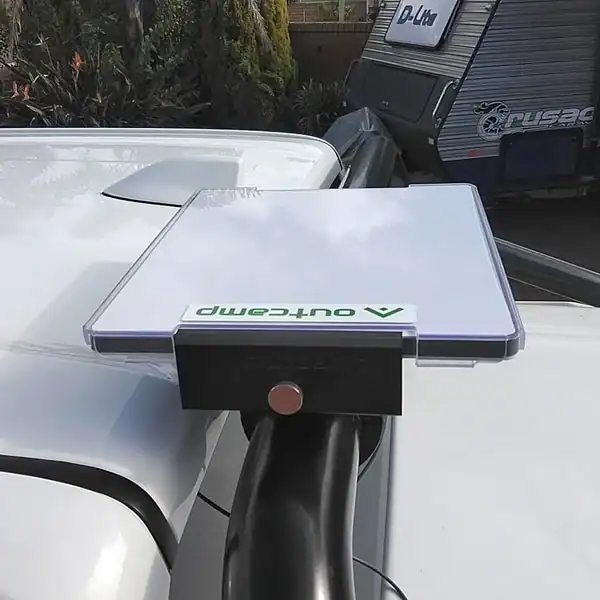
The Starlink Mini is SpaceX’s compact, portable satellite dish. It connects to the same constellation of low earth orbit satellites as the full size Starlink system, but everything is shrunk down into a single flat unit about the size of a laptop. The dish, modem, and WiFi router are all built into one piece of hardware. You prop it up with the included kickstand, point it at the sky, open the Starlink app on your phone, and you are online.
What’s in the box
- The Mini dish: A flat, rectangular antenna with integrated modem and WiFi router
- Kickstand: Props the dish at the correct angle
- 15 metre DC power cable: Connects to the included power supply
- AC power supply: Standard 110V wall adapter
- Pipe adapter: For semi permanent mounting options
The key difference from the standard Starlink dish is that everything is integrated into one unit. With the Standard system, you have a separate dish, a separate router box, and cables connecting them. The Mini eliminates all of that. One flat device, one power cable, done.
Built in WiFi: The Mini has a WiFi 5 (802.11ac) router built right in, supporting both 2.4 GHz and 5 GHz networks. You can connect multiple devices at once. There is also an ethernet port if you want a wired connection or want to plug in a third party router for better WiFi coverage across a larger area. Most people will not need an external router for typical camping or cottage use with a few devices.
Starlink Mini Pricing in Canada (March 2026)
SpaceX changes the Mini’s price constantly, sometimes multiple times in a single month. Here is the full picture as of March 2026.
Hardware cost
| How to Get It | Price (CAD) | Notes |
|---|---|---|
| Regular list price | $399 | What you see on the Starlink app when no promo is running |
| Promotional sale price | $279 to $349 | SpaceX runs frequent sales; check starlink.com, Best Buy, Home Depot |
| New customer activation benefit | ~$50 off current price | Customers new to Starlink may see an additional discount at checkout |
| Free with Residential Max | $0 | The $140/mo Residential Max plan includes a free Mini Kit for travel |
Why prices vary: If you see $249 quoted on one website and $399 on the Starlink app, both might be correct at different points in time. SpaceX has priced the Mini at $599 (launch), $399 (regular), $299 (November 2025 sale), and $279 (January 2026 record low) over the past year. The price you pay depends on when you buy and whether a promotion is active. Always check the actual checkout price before purchasing. The best places to check are starlink.com, Best Buy Canada, and Home Depot Canada.
Monthly plans (Roam)
The Mini uses Starlink’s Roam plans, designed for portable use. These are the current Canadian prices:
| Plan | Monthly (CAD) | Data | Best For |
|---|---|---|---|
| Roam 100GB | $70 | 100GB high speed, then low speed (~1 Mbps) | Weekend trips, occasional use |
| Roam Unlimited | $189 | Unlimited, no throttling | Full time travel, RV life, heavy streaming |
| Standby | $5 | ~0.5 Mbps (barely functional) | Pausing between trips or seasons |
The 100GB Roam plan was doubled from 50GB in January 2026 at no extra cost, which made it a much better deal. After your 100GB of high speed data is used up, you get unlimited data at very low speeds (under 1 Mbps up and down), enough for basic messaging but not streaming or video calls.
For most weekend campers and cottage visitors, the $70 Roam 100GB plan is enough. A long weekend of streaming and browsing for a family of four typically uses 30 to 50GB. If you are a full time RVer or use it for weeks at a stretch, go with Unlimited at $189. And if you only use the Mini a few times a year, pause the service between trips or drop to Standby at $5 per month.
For full details on every Starlink plan available in Canada, see our complete Starlink Plans and Pricing guide.
Where to order
You can buy the Starlink Mini Kit from:
- starlink.com (direct from SpaceX, ships to your door, ~$20 shipping)
- Best Buy Canada (in store pickup or delivery, sometimes has exclusive pricing)
- Home Depot Canada (in store pickup available at select locations)
- Costco (stocks kits seasonally, sometimes bundles with accessories)
You will also need the free Starlink app (iOS and Android) to activate the service, choose your plan, and manage your account. The app is required for setup.
Real World Speeds: What You Will Actually Get
| Metric | Typical Range | Notes |
|---|---|---|
| Download | 50 to 150 Mbps | Can spike above 200 Mbps in ideal conditions |
| Upload | 8 to 25 Mbps | Good enough for video calls and photo uploads |
| Latency | 25 to 50 ms | Low enough for video calls and casual gaming |
What works great
Streaming Netflix, Disney+, and YouTube works perfectly, including 4K when conditions are good. Video calls on Zoom and Teams are smooth with one or two participants. Web browsing, email, social media, and messaging all feel like normal home internet. Music streaming on Spotify or Apple Music is seamless. Uploading photos to social media is fast enough to not feel frustrating.
What works okay but has limits
Video calls with more than four or five people can get choppy if bandwidth dips during congestion. Uploading large video files (several gigabytes) works but takes time since upload speeds top out around 25 Mbps. VPN connections add some overhead and slow things down by roughly 20 to 30 percent, though the connection stays stable.
What does not work well
Competitive online gaming has too much latency variability for serious play. Downloading massive game files (50 to 100 GB) is slow and eats through a 100GB data plan fast. Anything requiring zero interruption connectivity will hit occasional brief dropouts, especially near trees or buildings.
Evening congestion: Speeds tend to dip between 6 PM and 11 PM when more people are using the network. Roam plans also have lower network priority than Residential plans, so during busy times, Roam users are served after Residential users. In practice, most camping and cottage locations in Canada have very few Starlink users nearby, so congestion is rarely a problem outside of popular provincial parks on long weekends.
Best Use Cases for Canadians
Camping and backcountry trips
This is the Mini’s sweet spot. It fits in a backpack, sets up in minutes, and delivers real broadband at campsites, fishing spots, and backcountry locations where your phone shows “No Service.” Pair it with a portable power station and you have a self contained internet setup that goes anywhere. The 100GB Roam plan at $70 per month is usually enough for a long weekend of streaming and browsing, and you can pause the service between trips.
Cottage weekends
If your cottage has no internet or terrible DSL, the Mini changes everything. You can either leave it at the cottage permanently or bring it in your car each trip. For a full breakdown of how to set up Starlink at a seasonal property, including how to deal with trees, winterize the equipment, and choose between the Mini and a dedicated Residential plan, see our Starlink for Cottages guide.
RV and road trips
The Mini works while your vehicle is moving, so passengers can browse and stream during the drive. At campgrounds, set it on a picnic table or the roof of the RV and you have better internet than most campground WiFi networks deliver. For more on staying connected on the road, see our RV WiFi guide.
Backup internet at home
Some Canadians buy the Mini as a failover for when their home internet goes down. At $5 per month on Standby, it sits in the closet until you need it. When your Bell or Rogers connection drops, you activate the Mini and have internet in ten minutes. Especially useful in rural areas where outages can last hours or days.
Outdoor events and tailgating
If you run a booth at a farmers market, tailgate before a game, or host outdoor events where you need internet for payment processing or guest WiFi, the Mini is a reliable portable hotspot. The built in router supports up to 128 devices, so your whole group can get online.
How to Power the Mini in the Field
This is the part that trips people up. The Mini needs 25 to 40 watts of continuous power, which is modest, but you still need a plan for powering it away from a wall outlet.
Option 1: Portable power station (most popular for camping)
A 300 watt hour power station (like the EcoFlow River 2 or Jackery 300) runs the Mini for roughly 7 to 10 hours. A 1000 watt hour unit gives you 24+ hours. Add a 100 watt solar panel and you can run it indefinitely in decent weather. This is the most common setup for campers.
Option 2: Vehicle 12V power
Buy a 12V DC cable (around $30 to $60 CAD on Amazon) and run the Mini directly from your car or truck’s cigarette lighter outlet. The engine needs to be running or you will drain your battery. If running a long cable (more than 5 metres), use thicker gauge wire (14 AWG or better) to avoid voltage drop issues that can cause random reboots.
Option 3: USB C power bank (works in a pinch)
The Mini has a USB C port that can accept power from a high capacity laptop power bank. Units rated at 65 watts or higher generally work. A 20,000 mAh bank gives roughly 3 to 5 hours of runtime. Best as an emergency backup, not a primary power source.
Important: Disable Snow Melt mode in the Starlink app whenever you are running the Mini on battery or vehicle power. Snow Melt is designed for permanently mounted dishes and can double the Mini’s power consumption to 60 watts sustained. You do not need it for portable use.
Mini vs Standard Dish: Which One Should You Buy?
This is the most common question I get. Here is the honest comparison:
| Feature | Starlink Mini | Starlink Standard (Gen 3) |
|---|---|---|
| Hardware price | $279 to $399 CAD (varies) | $349 to $399 CAD (or $0 rental in select areas) |
| Weight | 1.1 kg | ~3.2 kg dish only (separate router adds ~1 kg) |
| Size | Fits in a backpack | Needs a carry bag or vehicle space |
| Router | Built in WiFi 5 | Separate WiFi 6 router (better range) |
| Typical download | 50 to 150 Mbps | 100 to 220 Mbps |
| Power draw | 25 to 40 watts | 75 to 100 watts |
| Obstruction tolerance | Less tolerant (smaller antenna) | More tolerant (larger antenna) |
| Best for | Travel, camping, portable use | Fixed home, cottage, permanent installs |
Buy the Mini if: You want to carry it in a backpack, power it from a battery, and move it between locations. The portability and low power draw are worth the slightly lower speeds and WiFi range.
Buy the Standard if: It will stay in one place most of the time (your home, a cottage with year round use, a permanent RV setup). The Standard is faster, has better WiFi range with its separate WiFi 6 router, and handles tree obstructions better because of its larger antenna.
Get both (Residential Max): If you have Starlink at home and also want a Mini for travel, the Residential Max plan at $140 per month includes a free Mini Kit and 50% off Roam plans. This is the best way to have internet at home and on the go from a single subscription.
Using the Mini at a Cottage
Cottage use is such a common Canadian scenario that we wrote a full guide dedicated to Starlink for Cottages. But here is the quick version for the Mini specifically.
The Mini works well as a “bring it each trip” cottage solution. Toss it in the car, set it on the dock or deck when you arrive, and you have internet in ten minutes. The 100GB Roam plan at $70 per month covers a typical long weekend of family streaming and browsing. Pause the service when you head home.
If you want the Mini to live at the cottage permanently, you can mount it outdoors with the included pipe adapter. Just know that the Mini’s smaller antenna makes it more sensitive to tree obstructions than the Standard dish. If your cottage is surrounded by tall pines, you may need to mount it on a roof peak or a nearby boathouse to get clear sky. The cottage guide covers tree obstruction solutions and winterizing in detail.
For cottages used more than 4 to 5 months per year, a dedicated Residential plan with the Standard dish is usually a better investment. The Standard delivers faster speeds, better WiFi coverage for larger properties, and Residential plans have higher network priority than Roam. If you need help mounting a dish, our Starlink Installers directory lists verified professionals in every province.
Limitations You Should Know
Trees are the biggest enemy
The Mini’s smaller antenna is more sensitive to obstructions than the Standard dish. Even thin branches crossing the dish’s field of view can cause brief interruptions every few minutes. Use the “Check for Obstructions” feature in the Starlink app before setting up. You want as close to zero percent obstruction as possible.
WiFi range is modest
The built in WiFi 5 router covers a campsite or a single room within about 10 to 15 metres of the dish, though range varies with obstacles. For a larger cottage or multi room RV, plug in a third party WiFi 6 mesh router via the ethernet port for better range. The Starlink Gen 3 Mesh Router ($80 CAD) or the Router Mini ($40 CAD) are easy add ons.
100GB goes faster than you think
A single 4K Netflix stream uses about 7 GB per hour. A family of four streaming for a long weekend can blow through 100GB surprisingly fast. If you plan on heavy streaming, stick to HD quality (about 3 GB per hour) or budget for the Unlimited plan at $189 per month.
Roam priority is lower than Residential
During network congestion, Residential users get served before Roam users. In busy areas like popular provincial parks on a holiday weekend, you might notice slower speeds during evening hours. In remote locations with few other Starlink users, this is rarely an issue.
No uptime guarantee
Roam is a consumer plan with no service level agreement. Brief interruptions happen during satellite handoffs, heavy weather, or when obstructions pass through the dish’s field of view. Do not rely on the Mini as your sole communication lifeline in a genuine emergency.
Who Should Buy the Starlink Mini (and Who Should Not)
The Mini is a great fit if you:
- Camp, fish, or hike in areas without cell service and want real internet
- Own a cottage with no internet and want a portable, seasonal solution
- Travel by RV across Canada and need connectivity on the road
- Want a backup internet device for when your home Bell, Rogers, or Telus connection goes down
- Already have Starlink Residential Max at home and get the free Mini
- Attend outdoor events, farmers markets, or tailgates and need a hotspot
The Mini is probably not right for you if:
- You only need internet at one fixed location (the Standard dish is faster and better value)
- You live in a city with reliable fibre and do not travel to areas without connectivity
- You need guaranteed uptime for professional or medical applications
- Your primary use case is competitive online gaming (latency is too variable)
- You are on a very tight budget (the $70 to $189 monthly cost adds up over time)
If you are in the “not right for you” camp but live in a rural area where fibre and cable are unavailable, look at the Starlink Standard Residential plan instead. Our Starlink Plans and Pricing guide covers every option. And if you are comparing Starlink against traditional ISPs, our Bell vs Rogers vs Telus comparison can help you decide.
Frequently Asked Questions
How much does the Starlink Mini actually cost in Canada?
The regular list price is $399 CAD. SpaceX runs frequent promotions that have dropped it to $279 to $349 CAD at various points in 2025 and 2026. New customers may see an additional activation discount. Residential Max subscribers ($140/mo) get a free Mini Kit. Always check the current price at starlink.com, Best Buy, or Home Depot before buying, as it changes without notice.
Is the Starlink Mini worth it?
For Canadians who regularly camp, cottage, or travel to areas with no cell service, yes. Nothing else delivers 50 to 150 Mbps in a backpack sized device. At $70 per month for occasional use with the ability to pause between trips, it is reasonable for what you get. If you only need internet at home, the Standard dish is a better investment.
How fast is it?
Expect 50 to 150 Mbps download and 8 to 25 Mbps upload in typical Canadian conditions. Latency is 25 to 50 ms. Fast enough for streaming, video calls, and browsing. Not fast enough for competitive gaming.
Can I use it at my cottage?
Yes. Bring it each trip or mount it permanently. For detailed cottage setup advice, see our Starlink for Cottages guide.
How do I power it while camping?
Portable power station (300Wh = 7 to 10 hours), vehicle 12V adapter ($30 to $60), or USB C power bank (65W+ for 3 to 5 hours). Disable Snow Melt mode in the app to save power.
Mini or Standard dish?
Mini for portability and travel (1.1 kg, uses half the power of the Standard). Standard for fixed locations (faster speeds, better WiFi, handles trees better). Residential Max ($140/mo) includes both: a Standard at home and a free Mini for trips.
Can I pause the service?
Yes. Roam plans can be paused and unpaused anytime. Standby mode costs $5 per month and keeps your account active. You can also cancel entirely with no penalty since there are no contracts.
Does it work while moving?
Yes. The Mini is designed for in motion use and works reliably at highway speeds. Expect brief interruptions under bridges, in tunnels, or under dense tree cover. Many Canadians use it for streaming and navigation while driving.
How many devices can connect?
The built in router supports up to 128 devices. For a family with phones, tablets, and a laptop, no issues. For better WiFi range across a larger area, add a third party router via the ethernet port.
The Bottom Line
The Starlink Mini is the best portable internet device available in Canada. Nothing else delivers 50 to 150 Mbps satellite broadband in a 1.1 kg package that sets up in ten minutes and works anywhere with clear sky.
Is it perfect? No. The WiFi range is limited, trees are a real problem, the 100GB data cap goes fast with heavy streaming, and the monthly cost is not trivial. But for Canadians who have spent years dealing with zero connectivity at cottages, campsites, and remote locations, it solves a problem that nothing else can.
Starlink offers a 30 day satisfaction guarantee on new signups, so you can test it at your favourite spots and return the hardware for a full refund if it does not deliver. For most people who try it, it does.